Best Lightroom Presets for Fitness Influencers
In the fast-paced world of social media, visuals speak louder than words—especially for fitness influencers. Whether you’re sharing transformation photos, workout videos, or lifestyle reels, consistent, high-quality edits help you stand out. That’s where fitness presets Lightroom tools come into play.
Lightroom presets offer a powerful way to edit photos quickly while keeping your feed professional and cohesive. For fitness influencers, they can highlight muscle definition, enhance lighting in gym environments, and bring energy to outdoor workout shots. If you’re ready to elevate your content, this guide covers everything you need to know about the best Lightroom presets tailored specifically for fitness content.
Why Fitness Lightroom Presets Matter
Fitness photography has unique lighting, color, and contrast challenges. From harsh gym lights to low-light home setups, your raw images might not reflect the energy or aesthetics you intended. Fitness presets in Lightroom solve this by applying calibrated adjustments to tone, contrast, sharpness, and color—all with one click.
Well-crafted presets can:
- Emphasize muscle tone and definition
- Balance skin tones after a sweaty session
- Brighten dull indoor lighting
- Create a uniform brand look on Instagram
These advantages make Lightroom presets an essential part of any fitness influencer’s content toolkit.
Key Features of High-Quality Fitness Presets
Not all presets are created equal. When choosing the right fitness presets Lightroom creators should consider certain characteristics that deliver the best results consistently.

Skin Tone Balance
Fitness photography often involves close-ups of faces and bodies. Presets should enhance skin tones without making them look overly orange or washed out. Look for presets with natural warmth and adjustable tone curves.
High Contrast with Detail Retention
Defining muscles and physical progress requires a balance between contrast and clarity. The best fitness presets will increase shadow contrast without crushing detail.
Color Pop with Subtlety
You want colors that pop—think gym equipment, workout clothes, or sunrise skies during outdoor runs—but without making the image look over-edited. Presets with tasteful saturation adjustments and clean white balances help achieve this.
Adaptability Across Lighting Conditions
Whether you shoot in a gym, outdoors, or at home, the presets should work across diverse settings. Versatile fitness Lightroom presets are designed to handle inconsistent lighting without requiring major manual adjustments.
Top Preset Styles for Fitness Influencers
Depending on your aesthetic and fitness niche, certain preset styles may work better than others. Here’s what many top influencers lean toward:
High-Definition Gym Presets
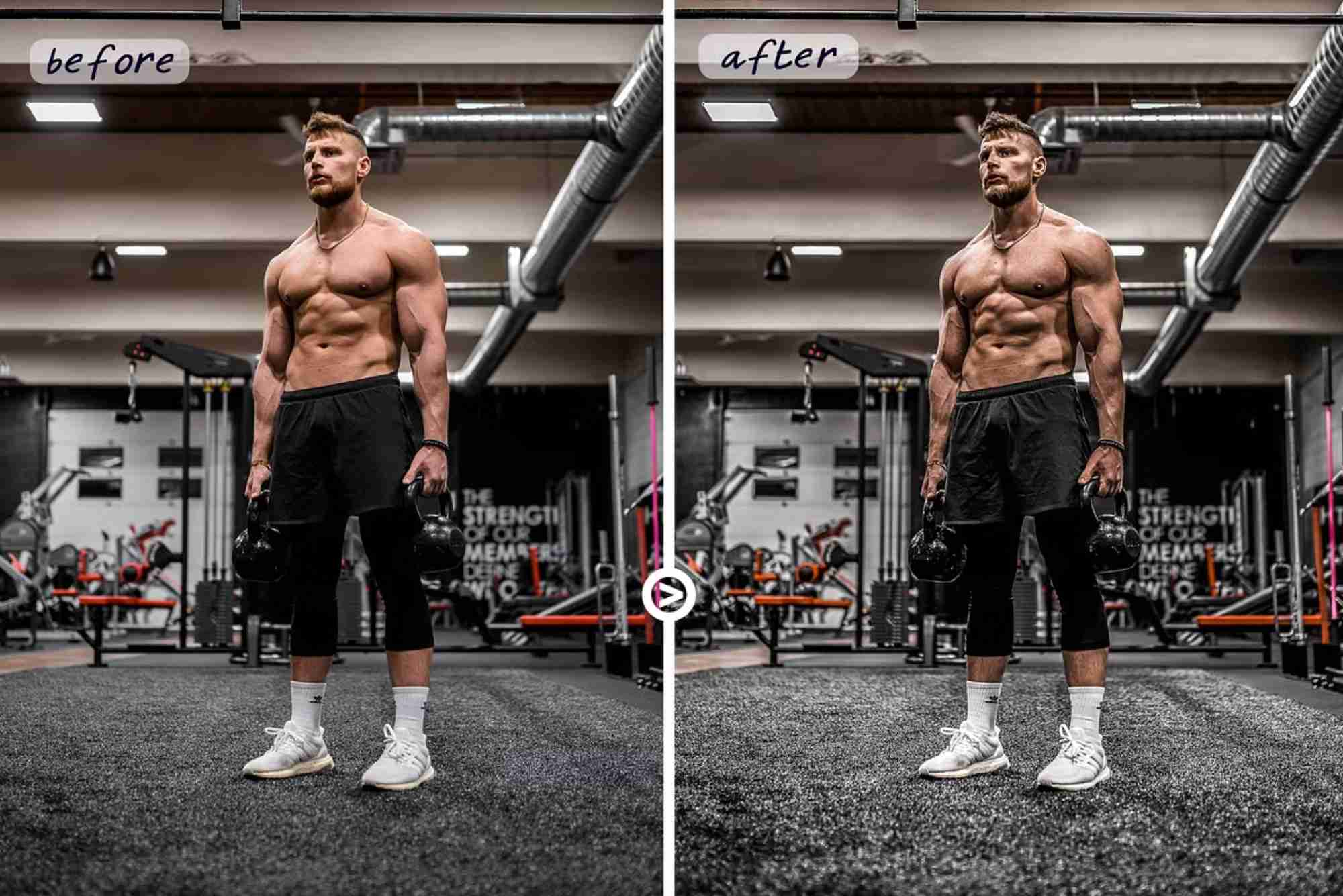
These focus on sharpness, deeper blacks, and high clarity—perfect for intense training photos, weightlifting progress shots, or dramatic lighting scenarios in gyms.
Natural Outdoor Fitness Presets
For influencers who post beach workouts, hiking, or park sessions, these presets enhance natural lighting, skin glow, and environmental colors without overpowering the frame.
Dark and Moody Tones
If your fitness brand leans into grit, grind, and shadowy aesthetics, moody presets with cool tones and lowered highlights can evoke that cinematic, hardcore vibe.
Clean and Bright Lifestyle Edits
Great for wellness and body transformation influencers, these presets favor soft highlights, light shadows, and overall brightness—ideal for “before and after” content or home workouts.
How to Use Lightroom Fitness Presets Effectively
Just downloading fitness presets for Lightroom isn’t enough. To get the most from them, follow these expert tips.
Shoot in RAW
RAW files retain more image data, making it easier for the preset to apply clean edits. If you shoot in JPEG, results might be inconsistent.
Adjust Exposure First
Presets don’t magically fix all lighting issues. Before applying one, fine-tune your photo’s exposure for best results.
Tweak for Skin Tone Consistency
While presets save time, you should still fine-tune white balance or hue settings to make sure your skin tone looks healthy and natural.
Use Presets as a Base
Don’t feel limited by what the preset gives you initially. Think of it as a starting point and adjust contrast, clarity, or saturation to match the mood of your content.
Lightroom Desktop vs. Mobile for Fitness Edits
One common question among influencers is whether to use Lightroom on desktop or mobile. Here’s the breakdown:
Lightroom Desktop (Classic or CC) gives you full control with tools like tone curves, noise reduction, and lens corrections. It’s ideal for photographers who batch-edit content professionally.
Lightroom Mobile, however, is fast, convenient, and powerful enough for influencers on the go. Many preset creators offer mobile-compatible versions, making it easy to post high-quality content straight from your phone.
How to Choose the Right Fitness Lightroom Preset
With hundreds of presets available online, choosing the right one can be overwhelming. Here are a few ways to make the right decision:
- Preview examples: Look at before-and-after photos in gym or fitness settings.
- Check compatibility: Ensure the preset works on your version of Lightroom (Desktop, Mobile, or both).
- Consider your brand tone: Do you want bright and friendly, or intense and dramatic?
- Test before you commit: Many creators offer free sample packs or trial versions. Try a few and see what aligns best with your visuals.
Where to Find the Best Fitness Presets
Some of the best presets come from content creators who understand the fitness niche. Look for Lightroom presets made by photographers or influencers with real experience in fitness photography. Etsy, Creative Market, FilterGrade, and individual influencer shops are great starting points.
Avoid overly generic packs titled “Instagram Presets” unless they have specific adjustments for gym or workout environments. Reviews, ratings, and sample photos are your best indicators of quality.
Make Every Post Count with the Right Preset
As a fitness influencer, your visual content is a reflection of your hard work, discipline, and personality. Fitness presets in Lightroom help you communicate that energy more effectively. With the right presets, every gym selfie, progress photo, or transformation video becomes part of a larger, polished brand narrative.
FAQs
What are the best Lightroom presets for gym photos?
Presets with high contrast, clarity, and enhanced shadow detail work best for gym photos. Look for presets labeled “HD Gym,” “Dark Tones,” or “Muscle Definition.”
Can I use fitness presets on Lightroom Mobile?
Yes, many creators offer .DNG versions of presets specifically designed for mobile use. You can easily import them into the Lightroom Mobile app and apply them in one click.
Are fitness Lightroom presets worth buying?
Absolutely. High-quality presets save editing time, improve photo consistency, and boost your professional appearance—especially important for influencers looking to grow their audience or collaborate with brands.
How do I install Lightroom presets?
For desktop, you import .XMP files into the Develop module. For mobile, you add .DNG files as images, copy settings, and save as a preset. Most creators include detailed installation guides.
Will presets work on videos or just photos?
Lightroom presets are for photos, but you can replicate similar edits in Adobe Premiere Pro or use mobile video editing apps that support LUTs (Look-Up Tables) based on Lightroom settings.